
Repository: source code, universal data and SDK
RIF Industries’ decentralized, open-source approach needed a purpose-built architecture: one that keeps data secure while distributing it.

Key takeawaysrepository
- Operators and logistics providers keep full control of their data; RIF keeps the global, real-time picture of status and ratings.
- A standard API and SDK connect each operator’s database to members through an SSH management system.
- Best practices and SOPs stay in sync: any change raises alerts.
- Shared states for every segment let stakeholders rate performance and project delivery.
Architecture: public, private, open source
To achieve this model, supply chain operators (SCO) and logistics providers would use a standardized API and SDK for their database platform, connecting with members through an SSH management system.
SCOs and logistics providers would keep full control of their data. In return, RIF Industries would maintain global, real-time data on the status and ratings of SCOs, logistics providers and stresses in the supply chain, through a public online portal. This model would provide real-time ratings of RIF Industries portal users, including SCO and logistics providers.

ASCP 1.0 and 2.0 components
The four components of the ASCP 1.0 public and private repository:
- Account database API connect with SDK, for remote database creation
- SCO/LOG best practices with SOP integration
- Qualification and balance management controls
- Real-time public access to supply chain status
New ASCP 2.0 services and libraries:
- Artificial intelligence (AI) and machine learning (ML) core
- Digital core supply chain twin for real-time backup and disaster recovery
- Analytics: public and private tools
- Open-source security mesh core
- HyperAutomation
- Next-generation robots and integration
- Autonomous process optimization
- Sustainability supply chain tools and alerts
- A collaborative ecosystem network for supply chain tools and alerts
Open-source applications and platforms let organizations use premium applications and information without licensing costs.[3] That frees resources and funds to develop more advanced technology, and to provide more transparent data streams, which until recently only the powerful and elite could get.
Bringing users into supply-chain processes can help add value and fix security risks in almost real time. Using public and entrepreneurial resources already in the marketplace, with feedback channels and new ideas as solutions, can turn ongoing stresses into opportunities.
SCO-LOG control panel
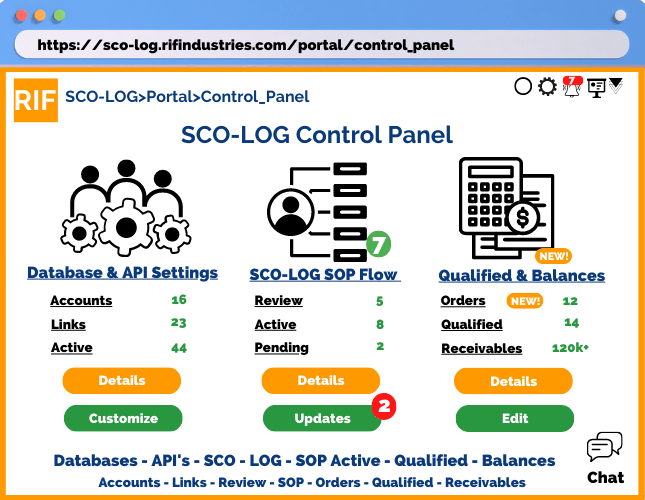
The SCO-LOG control panel gives SCO-LOG operators access to back-end settings, with automated and pre-built templates.
It provides controls and management for:
- Database and API settings, for creating SCO-LOG accounts
- SCO-LOG SOP flow, linking best practices to the SOP
- Qualification and balance settings
SCO-LOG qualifications & SOP setup
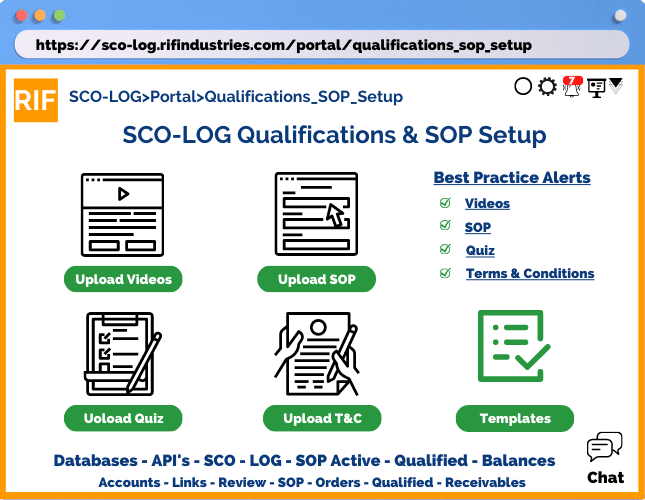
The dialog for SCO/LOG best practices and standard operating procedures (SOP) is part of the public and private repository functions. A drag-and-drop flow interface helps build an integrated solution: any change to best practices raises alerts on the SOP for users, so every update stays compliant and in sync with both sides of SCO/LOG operations, in real time.
A template system means that the industry vertical’s best practices raise an alert whenever the SOP is edited, or departs from the current best practices for that vertical.
Database creation: connect, API & SDK
The database connect, with its application programming interface (API) and software development kits (SDK), is the backbone of a linked set of shared tables, registered per user, that lets an SCO/LOG integrate its database and operating platform. It also lets them secure the registration with a unique API that tracks every interaction with the user, including permission levels based on the qualifications allowed through the Advanced Supply Chain Portal (ASCP) qualification system.
The database tables are created on a remote system. That lets the SCO/LOG put a secure firewall between its resources and the repository model and architecture, which provides a public-facing section of the portal for a more open and efficient operation across the disparate and unique aspects of different SCO/LOG organizations.
Template or custom database setup
- Create API key
- Create cloud URL
- Update database
SCO-LOG database registration: “Confirm All”
- Database and API connect
- Public real-time data authorization

Real-time supply chain ratings & status
Open-source applications and platforms have advanced, universal programming code such as JavaScript has been widely adopted, and cloud-based API functions with SDKs offer a universal set. Together they make it possible to deliver a shared set of states for each part of the supply chain, so every stakeholder can communicate challenges, and proposed solutions, to any stress in the system. They also provide a way to rate the performance of every part, or segment, of each project accurately, and to forecast results and delivery ranges more efficiently.
A more open supply chain, with open data sources, would make commerce more efficient and predictable within the economic framework we all live in today. RIF Industries is working on that future, and you can be part of it, as it works toward a more livable and efficient working environment, including for information and commerce.

Operator settings, at a glance

The account control panel

- SCO & API settings
- Activate and create the databases for project creation; integral to the open-source architecture of the ASCP, and designed to automate database and table creation with settings customized to SCO/LOG and SOP step-by-step requirements.
- Project & segment settings
- Create projects and set segment functions, with automated creation of API keys, databases, default permissions and payment and billing profiles by IV or SCO/LOG; automated or manual presentation of options and add-value options.
- Qualified balance settings
- Set up funding sources and pricing, manage automated payment of requests, and tell the SCO, with the user’s permission, globally or by SCO/LOG and industry vertical, whether funding sources and project funding levels are set up.
SCO & API settings

- API linked: how many SCO APIs have been activated
- Type: SCO (supply chain operators) or LOG (logistics operators of services)
- API connect: how many are being activated and connected to SCO products and services
- SCO LOG linked: the number of APIs or links to SCO or LOG products and services
- Last log entry: for security, the last event on that project account
Click a project for details, or use the SCO API wizard to link SCO and LOG products and services automatically.
SCO API account panel wizard

- Project segment drop-down to select the segment
- Automated cloud account URL
- Button to create the API
- Button to add the SCO database
- Button to add the LOG database
“Update All” automates the creation and linking of every database.
Wizard update details

- Status of each segment in the project
- SCO and LOG database IDs
Notifications and details on updates and database links; “Customize” adjusts settings before submission, and “Submit” activates and completes everything automatically.
References
- ↑ RIF Industries: Technology and intellectual property. Maynard L. Dokken, the record. maynardldokken.com/rif-industries/#technology
- ↑ AWS Nitro System. Amazon Web Services. aws.amazon.com
- ↑ Open-source software. Wikipedia. en.wikipedia.org
Every source above was opened and checked on 3 November 2026.
Further reading
- RIF: The model, built. SharedMercantile. sharedmercantile.com
- OSI Approved Licenses. Open Source Initiative. opensource.org
- API. Wikipedia. en.wikipedia.org
- Software development kit. Wikipedia. en.wikipedia.org
- Standard operating procedure. Wikipedia. en.wikipedia.org
- Digital twin. Wikipedia. en.wikipedia.org
- Artificial intelligence. Wikipedia. en.wikipedia.org
- Machine learning. Wikipedia. en.wikipedia.org
- DIFOT (delivery in full, on time). Wikipedia. en.wikipedia.org
Background on the subjects of this page, not cited above. Each link was opened and checked on 3 November 2026.