
Projects and segments: supply chain setup
A supply chain project on the Advanced Supply Chain Portal is a chain of segments, each one adding value, and building it should feel like buying a multi-feature product online.
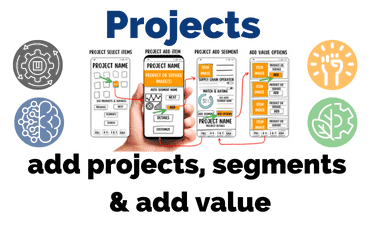
Notice. RIF knows that releasing basic details of its proprietary model can make them unpatentable.[1] As the saying goes, imitation is the sincerest form of flattery: those who follow RIF’s lead will, it hopes, offer a better user experience and push creativity toward innovation throughout the supply chain.
Key takeawaysprojects
- A project moves through four steps: profile, segments, knowledge profile, quote.
- Segments are links in the chain that add value; supply chain operators and logistics can be segments.
- Qualification gives operators a guide to the support each submission needs, and cuts support costs.
- Adding a segment takes three steps, plus optional value-add options.
The four-step project process
The model works as a simple four-step process for adding segments to a supply chain project:
- Create project profile
- Add segments
- Complete knowledge profile
- Submit for quote
A project is ready to submit for quotes once the user has completed the project guidelines the supply chain operators set. The user experience is designed to feel like buying an e-commerce product or service.
Terms of the model
- Portal with knowledge base
- An integral part of the platform. The qualification system works as a way to qualify a user with basic knowledge of each segment in the supply chain to submit a project. It gives the supply chain operator a guide to the level of resources needed to complete each submission, and significantly reduces the cost of support.
- Segments
- The parts of the supply chain that add value. Each project can have as many segments as are viable within its scope and available resources, and every step of adding a segment is designed to add value to the end product.
- Logistics
- The services that let a supply chain acquire, store and transport its products through the value-add segments to the end product’s destination.[2]
- Supply chain operators (SCO)
- Suppliers, vendors or other entities that provide supply-chain products or services, including logistics, for each segment. They can be included in the project as a segment.
- Advanced Supply Chain Portal (ASCP)
- A value-add and automation portal. Its framework uses a backward-compatibility model, as software does: each project segment can be added and customized while the project and segment are being created, and the system automatically pulls relevant options based on the profile of the segments in the project.
- Basic project setup
- Registration and know-your-customer (KYC) authentication.[3] ASCP project setup then asks for the industry vertical or product, the market geography, the project dollar range and the project name. A user can have as many viable projects as their profile allows.
- Value-add stages (VAS)
- The processes that add value to the end product before it moves to the next stage of production in the chain of segments.[4] Packaging or labeling a product or resource for the end product is an example: you buy the product, then have it labeled or packaged before logistics deliver it.
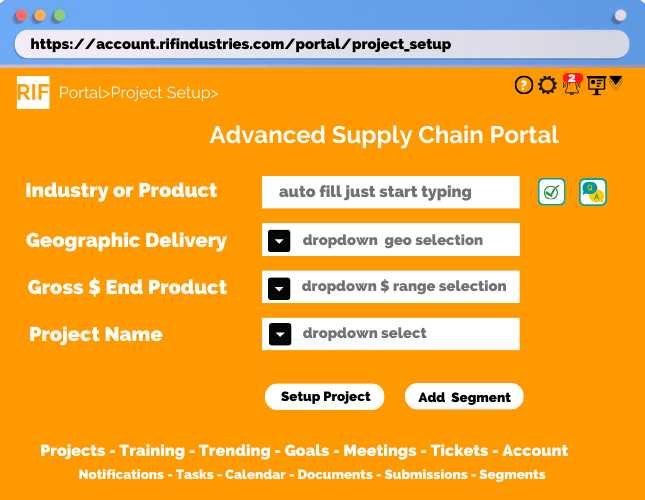
The user experience becomes like a multi-feature e-commerce purchase, and the industry knowledge gained is added value for every stakeholder.
The decentralized and open-source philosophy opens up opportunities dramatically for supply chain operators (SCO). It lets them cut operating costs and become more efficient, profitable and agile, without significant impact on operations or on the end product.
Where development stands
- The mobile forms are in mobile wireframe, because the focus was mobile first. Development will resume when the project restarts, as the About page explains.
- The third stage of development is the integration of AI and ML for supply chain operators and the Advanced Supply Chain Portal.
- This is a basic review of the application. Unique, still-patentable features have not been disclosed, so that the company can protect them legally before relaunch.
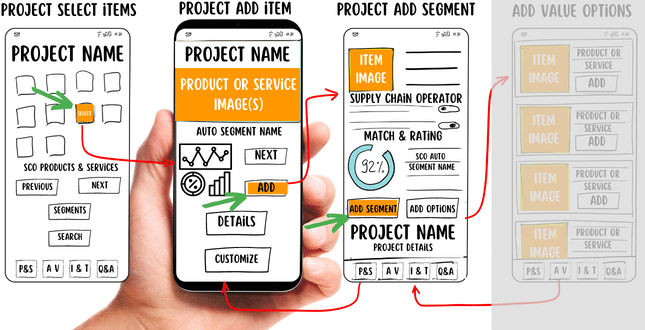
Walkthrough: adding a segment to a project
Step 1: adding a segment item
- The user selects the item they want to view.
- The user can click the Segments button for a pop-up of the segments already in the project.
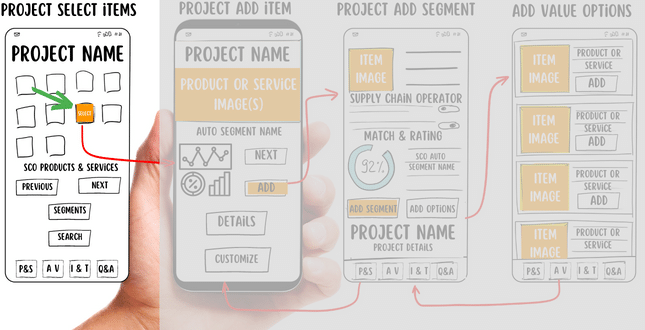
Step 2: review details, add the item and segment to the project
- The user selects “Add” to create a segment, named after the SCO, in the project automatically.
- The user can click Details or Customize for project settings.
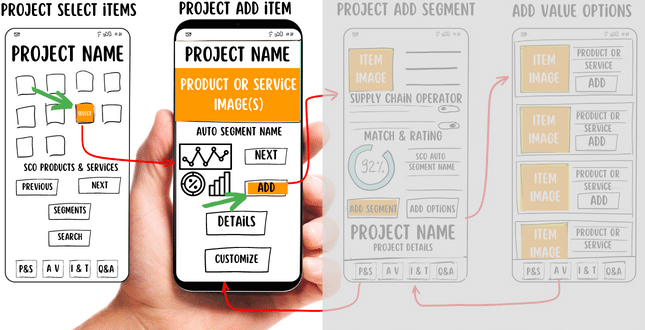
Step 3: confirm the selection and add the segment
- The user confirms the selection with “Add Segment”, which creates the segment, named after the SCO, in the project.
- The user can also click “Add Options”.
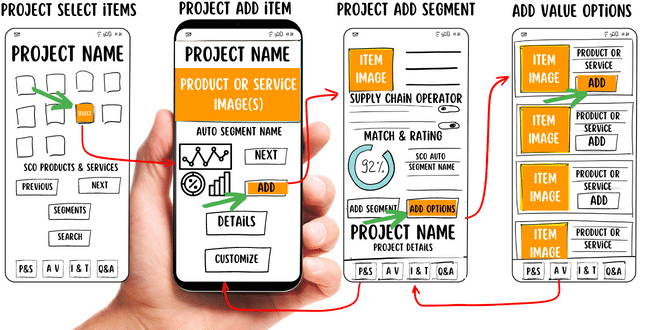
Optional: add-value options
- The user clicks “Add Options”.
- They select options with “Add”.
- They return to the project’s Add Segment screen.
- If satisfied, they click “Add Segment”.
The add-value options then appear in the project segment.
Why decentralized and open source
Innovation and disruption are the new norm. Decentralization and open-source solutions can create a more efficient operating model for the supply chain, and free resources to develop and integrate next-generation technology: automation, artificial intelligence (AI) and machine learning (ML).
The focus is the future beyond what was accomplished in 2009: hyperautomation, the digital supply chain twin, analytics everywhere, an open-source security mesh, ecosystem collaboration and sustainability.
A decentralized approach with open-source solutions using AI and ML can bring new, more efficient solutions and real-time visibility of potential operational weaknesses. It can help develop profitable best-practice and SOP customizations that maximize return on investment (ROI) for every stakeholder, creating a more efficient operation throughout the supply chain.
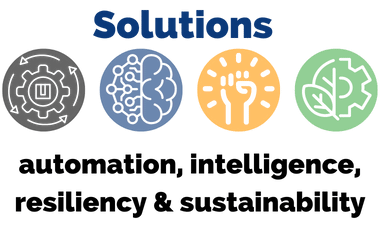
A decentralized open-source solution with AI and ML
- Publicly available, decentralized best practices and SOPs for RIF Members give organizations an efficient channel to tell those members how to operate their RIF Advanced Services Portal for that industry vertical.[5]
- The RIF Advanced Supply Chain Portal (ASCP) gives real-time visibility of issues and develops an efficient operating and delivery service model for RIF Members and operators.
- A more inclusive supply chain can bring significant financial benefits. The RIF ASCP takes an educational approach, giving supply chain operators the information they need to make informed decisions: to anticipate major disruptions, with real-time knowledge of local issues, and to let every piece of the supply chain work together more efficiently and find solutions faster.
- Open-source solutions free resources for artificial intelligence (AI), unlocking analytic value from data and information to optimize operations in real time.
- AI combined with machine learning (ML) unlocks analytic data and information for technical processes, and can find areas for cost reduction throughout the supply chain.
Supply-chain weaknesses can be turned into opportunities and strengths. An army of RIF Members, with AI and ML added, can change your organization’s profile from the past to the leader.
The future is a robust, stable and agile supply chain. It needs attention and forward thinking from everyone, with proactive strategies, greater visibility and accountability, and it has to start with a new way of thinking: a solution that lowers costs for consumers and organizations across the supply chain. Read more on the Solutions page.
References
- ↑ Protect new ideas and creations. Canadian Intellectual Property Office (CIPO), updated 18 March 2021. ised-isde.canada.ca
- ↑ Logistics. Wikipedia. en.wikipedia.org
- ↑ Know your customer. Wikipedia. en.wikipedia.org
- ↑ Value chain. Wikipedia. en.wikipedia.org
- ↑ Standard operating procedure. Wikipedia. en.wikipedia.org
Every source above was opened and checked on 3 November 2026.
Further reading
- RIF Industries. Maynard L. Dokken, the record. maynardldokken.com
- Supply-Chain: From raw material to value. SharedMercantile. sharedmercantile.com
- Supply chain management. Wikipedia. en.wikipedia.org
- Open-source software. Wikipedia. en.wikipedia.org
- Artificial intelligence. Wikipedia. en.wikipedia.org
- Machine learning. Wikipedia. en.wikipedia.org
Background on the subjects of this page, not cited above. Each link was opened and checked on 3 November 2026.